Slide Scanning San Diego

Slide Scanning San Diego

All our scans are done individually by hand to ensure the highest level of quality possible. Included in our standard pricing you will receive basic color correction, dust and scratch removal, exposure adjustment and fade restoration. After enhancements are complete your slide scans will be saved as a JPEG then copied to a CD-R or other media.

Slide Scanning

Slide Scanning

Perfect Image Video provides a professional high resolution slide scanning service for all major types of slides up to 4000 dpi.

Film to Hard Drive

Slides to Hard Drive

Transfer your slides to an external hard drive so you can digitally store your memories or simply view them on your computer. We use the latest technology to create high quality image files that will work on your Mac or PC.

Click here for more information.

All Media Locally Transferred

All Media Locally Transferred

Unlike most companies, we do NOT send your slides out to be processed. All work is done in house by an experienced professional.

Supported Formats

Supported Slide Formats

35mm Slide

35mm

Super 35 Slide

Super 35

35mm Half Slide

35mm Half Slide

110 Format Slide

110 Format

126 Format Slide

126 Format

Perfect Image Video Industry Standard
Each slide is individually processed Perfect Image Video Slashmark
Over/under exposed slides are corrected Perfect Image Video Slashmark
Color and sharpness corrected Perfect Image Video Slashmark
Frame Cropping Perfect Image Video Checkmark
Volume Discounts Perfect Image Video Checkmark
We Only Use 100 Year Archival Discs Perfect Image Video Slashmark
All Work Done On Premises Perfect Image Video Slashmark
Custom DVD Printing and Packaging Perfect Image Video Slashmark
100% Satisfaction Guarantee Perfect Image Video Slashmark
Additional Copies

Additional Copies

Once your DVD master is complete, order extra copies for family and friends. Each DVD copy will include your personal information printed on the disc and custom packaging.

Editing

Editing

Work with one of our experienced technicians to edit your home movies the way you want. Take out unwanted scenes, add titles, music and voice over to create a one of a kind video. When your editing is complete, we can output to DVD, a hard drive or upload to the internet. This process is cost effective and is a great way to organize your family memories.

DVD Slideshow

DVD Slideshow

Tell the Story of You, Your Family or Your Business with a Moving Picture Montage by Perfect Image Video. Nothing will mean more to your friends and family than a video DVD of your precious memories. Whether it’s for an anniversary, birthday or an important gift to hand down to your children, you’ll find the qualities and options to suit your needs in these special videos.

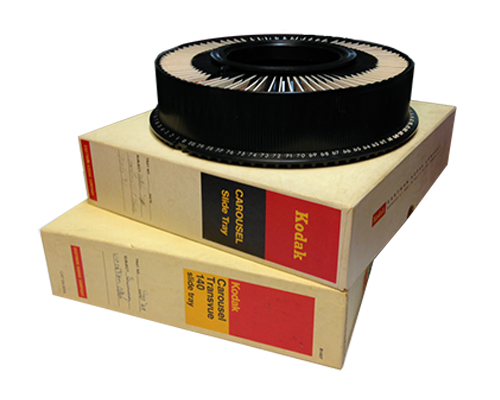
Q. Can I send my slides to you in the carousels?
A. Yes you can, but there is an additional charge to remove and replace them back in the carousel.

Q. At what resolution do you scan the 35mm slides?
A. We can scan your slides at 2000 dpi or 4000 dpi.

Q. Can I use the images to print photos or email to friends?
A. A CD-Rom of your jpeg images from us is just like having a CD-Rom of jpegs you made with your digital camera. There are no copy protections or restrictions on how you can use the images. You can put them on your computer from the CD-Rom and edit them, email them, print them, or use one as your screensaver.

Q. Can I try you out by sending in a smaller project first?
A. Sure! We are confident you will be satisfied with the quality of our service.

Q. Do I have to pay for scanning separately to order a DVD slideshow?
A. Yes. The scanning fees are separate from the DVD Slideshow fees. We have to scan your slides in order to make them into digital files. Then we can make a Slideshow Movie out of those files in addition to giving you archival quality image files on cd for use in your computer and to make reprints.

Q. How many images fit on one DVD slideshow?
A. Just over 1000 images will fit on one DVD movie disc.

Q. How long is each image on the screen?
A. The default setting for the images is 6 seconds. There is a 1 second fade in, the image stays on the screen for 4 seconds and then a 1 second fade out. This is what we found to be the best viewing time. The length can be adjusted a little, but 6 sec/image is what you should use to calculate how much music you will need.

Q. How long will my show be?
A. At 6 seconds an image there will 10 pictures a minute. So if you have 100 pictures your show will be 10 minutes long. If you have 750 your show will be 75 minutes long.

Q. Do I have to number my slides for my DVD movie in the order I want my video to be in?
A. Yes. You will need to number your slides in the order you would like them to appear.

Q. How do I indicate where to put my Title(s)?
A. Put your slides in groups for each new Title Slide and write the name somewhere on the group. Definitely indicate the order in which the titles will appear. You will also need to write or type out the titles and include any instructions for music.

Q. Do you offer Rush Service?
A. Yes. The additional cost for this service is 50% of the scanning price. We do this in order to pay an employee to work overtime in order to move a customer ahead in the Queue to be processed.

Q. Where are you located?
A. We are located in San Diego, CA and do all of our business from 1 location.

Q. Will my DVD slideshow be editable?
A. You cannot edit the DVD Slideshow once it has been made into a DVD. If you have special needs for your slideshow please give us a call and we will be happy to make recommendations or answer questions. You can also email any questions to admin@perfectimagevideo.com.

Q. Will the DVDs you create be compatible with my DVD player? A. The Slideshow Movie DVDs should work on most DVD players. Older DVD players have some restrictions on playing burned DVDs, but if your DVD player is less than 4 or 5 years old it should be fine.

Q. Can I order extra copies?
A. Yes, just let us know at the time of the order.

Q. Can I make copies of the DVD myself?
A. Yes. These DVDs are yours to do with what you like. You must have the proper burning software and a DVD Burner Drive installed on your computer.

Q. Could I make my own Slideshow Movie once I get my scanned images back on disc?
A. Sure. If you would rather make your own slideshow movie, you would just need to have some patience, a DVD burner and editing software. Windows Movie Maker and iDVD for the Mac are 2 examples of software that can create slideshow movies from digital files.

Q. How long will it take?
A. DVD Slideshow Movies generally take 2-5 business days depending on the size.

Q. Will you return my originals?
A. Yes, all your slides will be returned to you in the original boxes they were sent in.